











Your site slows down at the exact minute your Black Friday traffic peaks. Or a batch of payments starts failing, and orders that should be closing are just... not. The question isn't how to stop it. That decision already passed. The question is what you do in the next 30 minutes, while customers are already noticing and some of them are already posting about it.
A previous article in this series covered getting your existing support coverage ready for BFCM (the hours, channels, and content a small team preps before the season). This article is different.
It's the one that the CX guide for BFCM 2026 points you to when something has already gone wrong and started spreading in public, not before it.
- Speed decides the outcome, not the incident
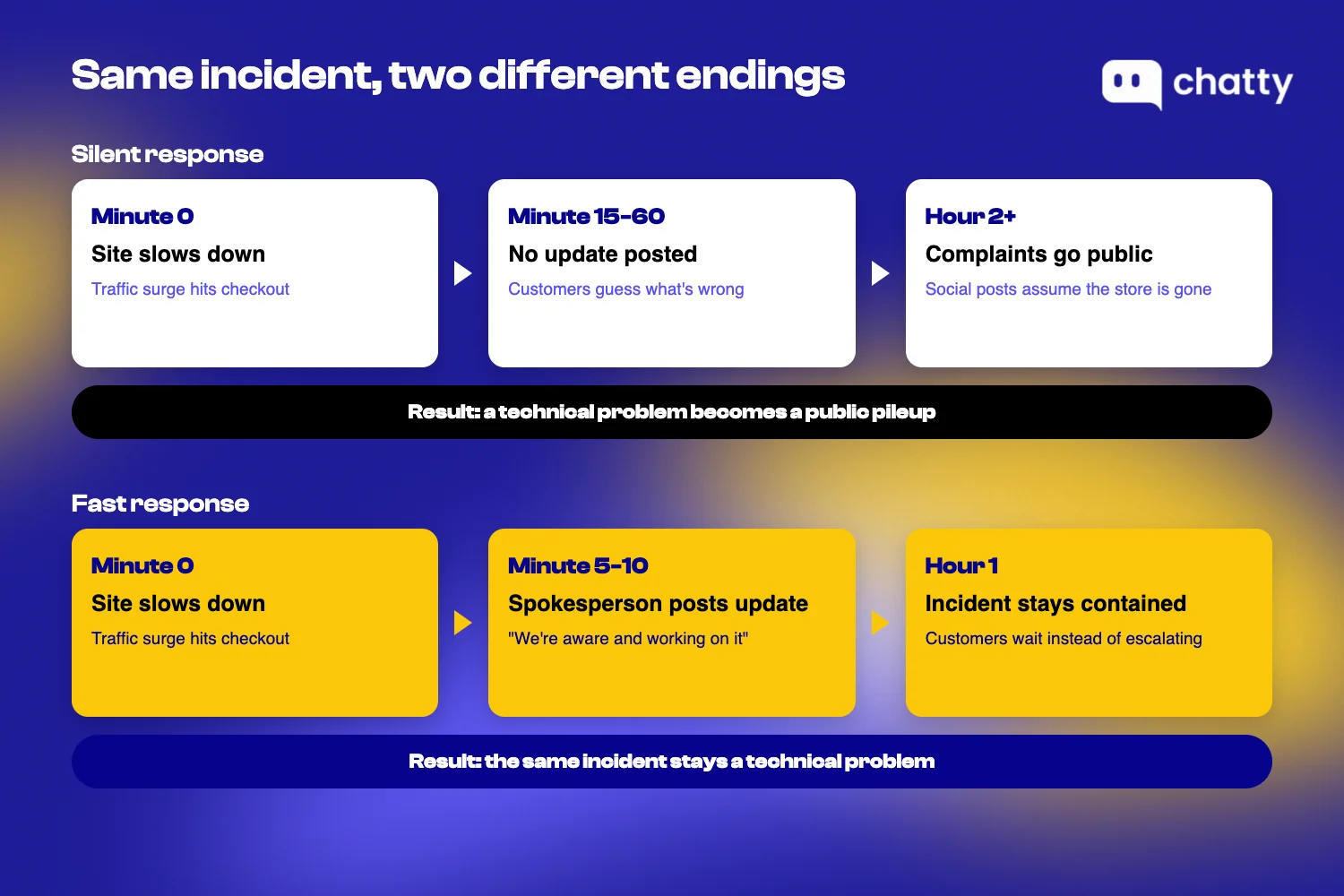
The delay between an incident and a clear customer answer, not the incident itself, is what turns a technical problem into a public pileup.
- Three decisions have to be made before BFCM starts
Who is the single spokesperson, what's the pre-written response for each likely incident type, and what's the threshold for notifying customers before they ask.
- Four incident types need their own playbook
Site slow or down, payments failing, a product selling out mid-sale, and reviews or complaints spiking publicly.
- This is not a prevention guide
It's about the customer-facing response once something has already gone wrong.
Why a BFCM crisis management plan is about response speed, not prevention
A BFCM crisis management plan works because it shortens the gap between an incident happening and a customer getting a clear answer, not because it prevents the incident. That gap, not the outage or the payment error itself, is what decides whether a technical problem stays a technical problem or turns into a public pileup on social media.
Most of what's written about Black Friday failures focuses on stopping them before they happen: load testing, CDN configuration, auto-scaling, failover architecture. That's real advice, and it's correct. It's also useless the moment an incident is already live and a merchant needs to know what to do in the next hour, not the next quarter's infrastructure budget.
A traffic spike is an infrastructure problem, and it gets solved or it doesn't. What customers actually remember, and what they post about, is how long they were left guessing before anyone told them what was going on. That gap is the part a small team controls on the day, and it is the part this plan is about.
Infrastructure content misses one thing: the root cause of a BFCM incident, whether it's a traffic surge or a third-party payment gateway failing, is usually outside a merchant's control. The response-speed gap is not. That's the one variable a 2-8 person team can actually manage during the highest-traffic days of the year, and it's the entire subject of this article.
The BFCM crisis management plan to build before something goes wrong
Three decisions close the response-speed gap, and none of them can be made while an incident is already underway. Lock these in before BFCM starts.
Decide who has the single voice before a crisis starts
One person, and only one person, speaks publicly during a BFCM incident. That single decision prevents the most common failure mode in a crisis: conflicting messages leaking out across email, social media, and live chat because three different people answered the same question three different ways.
For a 2-8 person team, this is usually one specific person: the owner or the eCommerce manager, not "whoever happens to be free." Name the role explicitly before BFCM starts. The wrong time to settle it is while a customer is screenshotting a support reply that contradicts what your Instagram account just posted.
A single, designated responder is the first thing to settle, because two people answering the same public complaint differently is its own incident. The same logic applies before a review crisis ever starts.
Naming the person is only half the job. If your AI assistant is the one handling conversations first, it also needs to know to send incident-related messages straight to that named person, not just to whichever agent happens to be online. Chatty's Transfer to human setting (feature #61, released Oct 27, 2025) lets a merchant configure exactly when and how an AI conversation hands off to a person. An incident-related conversation then routes straight to the one named spokesperson, instead of landing with whoever picks it up first.
Write the response template for each likely BFCM incident type, before BFCM starts
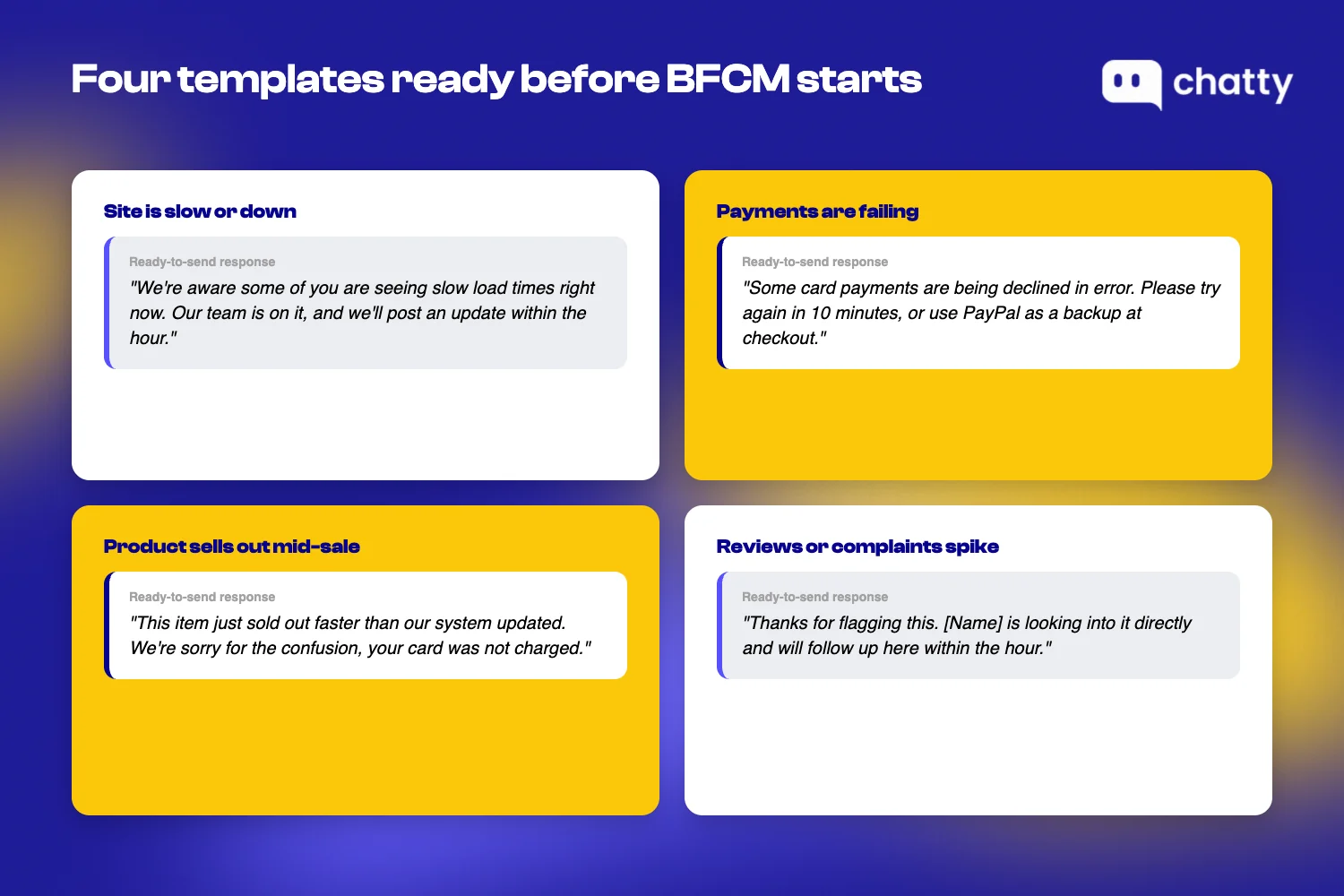
Four incident types account for most of what actually goes wrong during BFCM:
- The site is slow or down.
- Payments are failing.
- A product sells out mid-sale but the store still shows it as available.
- Reviews or complaints spike publicly.
Each one needs a response template that's already written, not something composed live while a queue of messages is piling up.
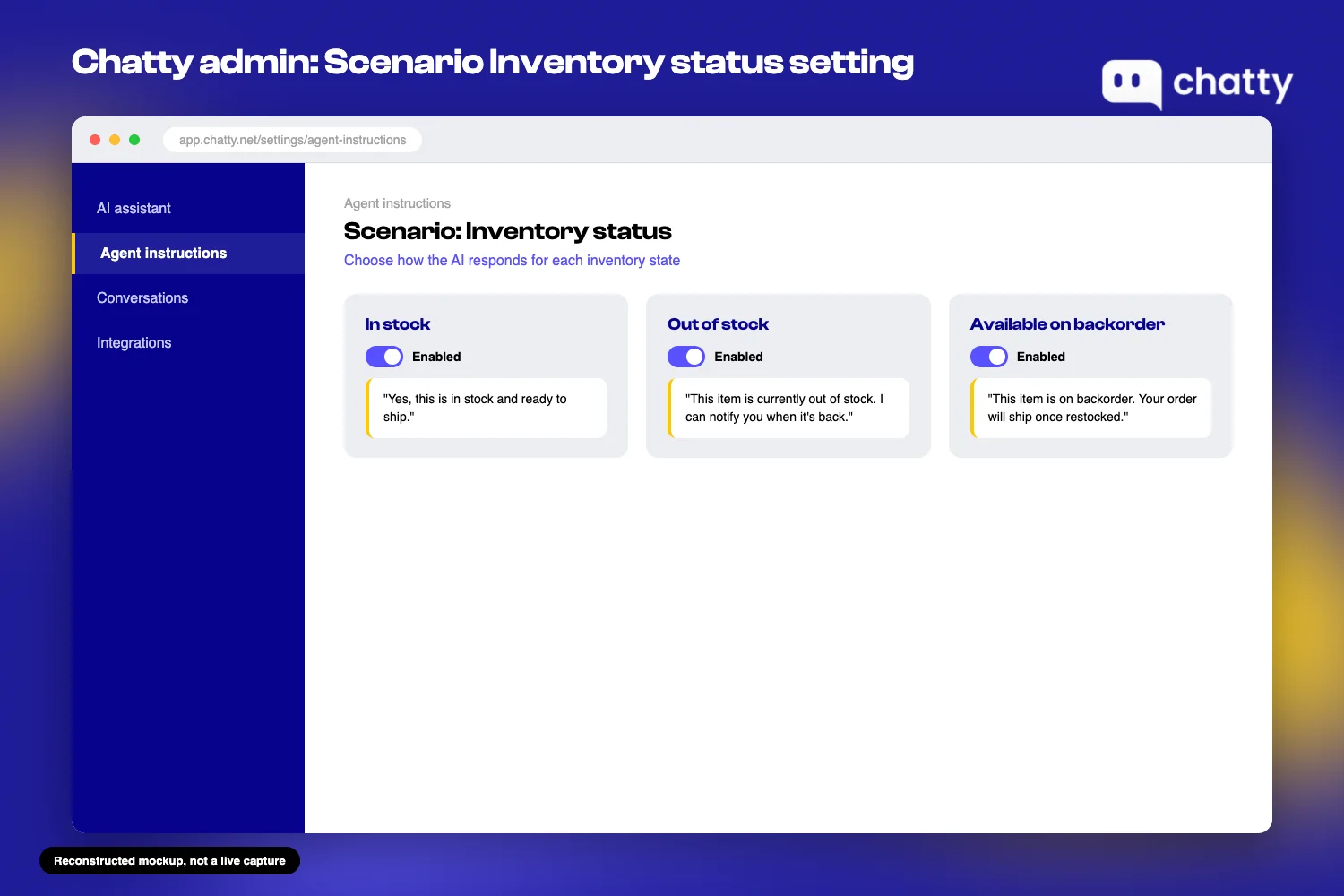
The stockout case deserves special attention, because it's often self-inflicted by the merchant's own automated channels. If an AI assistant confidently tells a customer a sold-out item is "in stock," that's not a traffic problem. That's an inventory-status gap the merchant could have closed in advance.
Chatty's Scenario Inventory status setting (feature #26, released Dec 31, 2025) lets a merchant customize how the AI responds based on real inventory state:
- In stock.
- Out of stock.
- Available on backorder.
That way, the AI doesn't confirm an order it can't actually fulfill.
Before BFCM starts, check whether every automated channel, AI assistant or otherwise, reflects real-time inventory status. An incident that begins with your own AI confirming a sold-out order is one you created, not one that happened to you.
Set the threshold for when to notify customers proactively, not wait for them to ask
Pick a concrete threshold now for when you switch from answering questions as they come in to notifying customers before they ask. This is the piece almost every existing resource skips. The standard advice is to watch signals like authorization approval rate and timeout frequency. That works well with an enterprise monitoring dashboard, but a 2-8 person team doesn't have one of those, and doesn't need one.
The practical version: track one or two signals you can see without extra tooling. The clearest one for most small teams is the number of inbound messages asking about the same issue within a short window, say, 15 minutes. Three or more customers asking "is checkout broken?" in that window is your signal to post proactively, not wait for the fourth, fifth, and fifteenth person to ask the same question separately.
This threshold matters even more if your coverage runs business hours only. If an incident starts overnight and nobody notices until morning, the gap this whole plan is designed to close has already widened for hours. A team without off-hours visibility should treat that blind spot as part of the threshold decision, not a separate problem.
How to respond to the 4 most common BFCM crisis scenarios
Knowing the three decisions above is one thing. Applying them in the middle of an actual incident is another. Below is what each of the four most common BFCM crisis scenarios looks like in practice, with the specific action to take and when to take it.
Your site is slow or down during peak BFCM traffic
The technical fix belongs to your dev team or hosting provider. The customer-facing response is your job, and it starts within minutes, not hours. The instant you confirm the outage, post an update wherever customers can still reach you (email, social media, or a status banner), even if all you can say is "we're aware and working on it."

The failure pattern is always the same: merchants who stay silent during an outage lose customers who assume the store is gone for good, not just temporarily down. A banner or a single social post costs nothing and buys you the time your dev team needs. Silence costs you the sale and the trust.
Payments are failing for a batch of customers at the same time
A 2-8 person team can't reroute a payment gateway. But within the first few minutes of noticing repeated failures, that team can post a clear notice and point customers to an alternative payment method. Do it immediately, before they retry the same failed card five times and risk a double charge.
Payment failures do not arrive one at a time. When a processor degrades, it degrades for everyone trying to check out in that window, so a handful of complaints in a few minutes usually means a much larger number of shoppers who hit the same wall and simply left. That is why the response has to be as fast as the failure, and why the notice matters even before you know the cause.
A product sells out mid-sale but your store still shows it as available
This is the scenario the response-template decision above exists to prevent. If it happens anyway, the fix during the incident is the same check: does the automated channel answering customer questions actually know the product is gone?
Chatty's Scenario Inventory status feature (#26, released Dec 31, 2025) is built for exactly this gap. It lets the AI reflect real inventory state instead of confidently confirming an order for something that's no longer available.
If this incident is already happening, the immediate customer-facing move is to correct every channel showing the item as available, all at the same time, not one by one as complaints come in. A customer who gets a confirmation email for a product that's actually out of stock now has a legitimate complaint to post publicly. That routes straight into the next scenario.
Negative reviews or complaints spike and start spreading publicly
Breaking the first day into four windows keeps a small team from reacting to the loudest review instead of the pattern behind it.
- Hour 1: Document every review and complaint as it comes in. Don't just react to the loudest one.
- Hour 2: Trace where the spike started, whether that's one bad experience amplified, a misleading product page, or a shipping delay nobody explained.
- Hour 3: Hand every public response to the single spokesperson you named before BFCM started, so nobody else improvises a reply that makes things worse.
- Day 1: Report the worst reviews to the platform with evidence, if they violate its policies.
The stakes justify the urgency. A one-star review outlives the incident that caused it: it sits on your listing for every shopper who checks reviews before buying, long after the outage is fixed. A spike of them, unanswered for hours, compounds that fast.

The BFCM crisis management plan comes down to speed, not prevention
None of the four scenarios above are within a small team's control to prevent. The traffic surge, the gateway failure, the customer who posts before asking, all of that happens regardless of how well-prepared a merchant is.
What is within a merchant's control is the gap between the moment something breaks and the moment a customer gets a clear answer. Closing that gap comes down to three decisions made before BFCM starts:
- One named spokesperson.
- A ready response for each of the four common incident types.
- A concrete threshold for going proactive instead of waiting to be asked.
If your team hasn't locked down basic BFCM support coverage yet (hours, channels, and handoff for business-as-usual), that's the place to start before this plan matters. Once that's in place, pair it with the season-wide view in the BFCM readiness playbook so prevention and response work together instead of leaving gaps between them.
See how Chatty supports merchants through BFCM if you want incident-related conversations routed to the right person and inventory-aware answers built into your AI assistant before the next surge hits.
Frequently asked questions
A BFCM crisis management plan is the customer-facing response process for when something goes wrong publicly during Black Friday or Cyber Monday, a site outage, payment failures, a stockout, or a spike in negative reviews. It's not a prevention checklist. It defines who speaks publicly, what to say for each incident type, and when to notify customers before they ask.
Aim to acknowledge an incident within minutes of confirming it, not hours. The delay between an incident happening and customers getting a clear answer is what turns a technical problem into a public escalation, so speed matters more than having a polished, complete explanation ready.
Post as soon as you confirm the outage, even with limited information. Silence does not read as "nothing is wrong", it reads as "nobody is home", and a shopper who cannot tell the difference between a broken checkout and an abandoned store assumes the worse of the two. An early, honest "we're aware and working on it" costs you nothing and stops that guess.
An AI assistant can help prevent one specific incident type: confirming orders for out-of-stock products. Chatty's Scenario Inventory status setting (#26, released Dec 31, 2025) lets the AI reflect real inventory state instead of defaulting to "in stock." For other incident types, like site outages or payment failures, the practical small-team signal is a spike in inbound messages asking about the same issue.
A readiness plan covers preparation before the season, staffing, hours, channels, and content. A crisis management plan covers the response during an active incident that's already visible to customers. Small teams need both, but they solve different problems at different points in the season.