










Last updated October 12, 2026. Every fact below was checked that day in Shopify's help center, on chatty.net/pricing and on both Shopify App Store listings.
Shopify Inbox is Shopify's free chat app, and since June 17, 2026 it includes an AI agent. Chatty is the AI chat app we build, and it bills per AI conversation.
Both AI agents now answer product questions from your catalog, add items to the cart and look up orders. So the useful question is not which AI is smarter. It is who starts the conversation, and what happens around it.
Start with the side-by-side table, then the numbers.
Chatty vs Shopify Inbox at a glance
Each row comes from Shopify's help center, chatty.net/pricing and the two Shopify App Store listings, all read on October 12, 2026:
| Chatty | Shopify Inbox | |
|---|---|---|
| Best for | Stores that want AI to sell from the catalog and start chats | Stores that want free AI chat for shoppers who ask |
| What you pay for | AI conversations; human chats are unlimited | Nothing |
| Price | Free (50 AI conversations/mo); Basic $19.99, Pro $68.99, Plus $199 | Free |
| Shopify App Store rating | 4.9 (1,877 reviews, 96% five stars) | 4.6 (5,810 reviews, 80% five stars) |
| AI learns from | Catalog, custom answers, URLs, files and instructions | Catalog, policies, pages and Knowledge Base |
| Adds products to the cart | Yes, from a product card | Yes |
| Helps with order status | Yes, from Basic | Yes |
| Starts a chat on its own | Yes, proactive chats on Pro and Plus | No |
| Contact details before the chat | Pre-chat form, no sign-in needed | Shop sign-in, or an email the shopper gives |
| Support email as tickets | Yes, Helpdesk on every plan | No |
| Sales reporting | Assisted orders, total sales, conversion rate | Assisted orders, assisted sessions, satisfaction rate |
| The one catch | Its Helpdesk has no SLA policies, macros or automation rules | Never messages a shopper who has not asked |
- Both AI agents now answer from your catalog and add to the cart. Shopify Inbox's agent launched June 17, 2026. It answers product and order questions, adds items to the cart and hands chats to your staff with context.
- The real difference is who starts the conversation. Inbox answers shoppers who open the chat. Chatty can also message shoppers who hesitate, such as with an abandoned cart reminder on Pro.
- Inbox is free at any volume. Chatty bills per AI conversation. Chatty is free for 50 AI conversations a month. Pro covers 500 for $68.99, and human chats never count.
- Reaching a shopper who left works differently. Inbox can reply by email only if the shopper signed in or gave an email. Chatty's pre-chat form asks for a name and email with no sign-in.
- Pick by job, not by winner. Inbox fits a small store whose shoppers ask first. Chatty fits a store that wants chat to start sales and to hold support email as tickets.
Shopify Inbox answers the shopper who asks, and Chatty can start the conversation
This is the one mechanism behind most differences between the two apps. Inbox waits for a shopper to open the chat. Chatty can also open it for them.
Shopify's chat settings guide covers a greeting, availability hours, automatic first replies and instant answers. Every one of these appears after the shopper decides to chat. Nothing fires when a cart sits idle or a shopper lingers on a product page.
Chatty's proactive chats are messages that appear on their own, based on what the shopper does. On the Pro and Plus plans, you can set up these and more:
- An abandoned cart reminder, when a shopper adds to cart and does not check out within the minutes you set.
- A cart booster that suggests add-ons, with conditions on the cart's value.
- Product recommendations on the page a shopper is viewing, or on a search or collection page.
That one difference decides most fits. If your shoppers already open the chat and ask, Inbox covers them for free. If you lose sales from shoppers who hesitate in silence, you need an app that speaks first.
What Chatty and Shopify Inbox now do the same
The June 2026 update closed most of the gap on the chat itself. According to Shopify's help center, both agents now share four abilities:
- Catalog answers. Each AI answers questions about products, stock and price, and suggests products.
- Add to cart. Each can put a recommended product in the shopper's real cart.
- Order help. Each helps a shopper check an existing order.
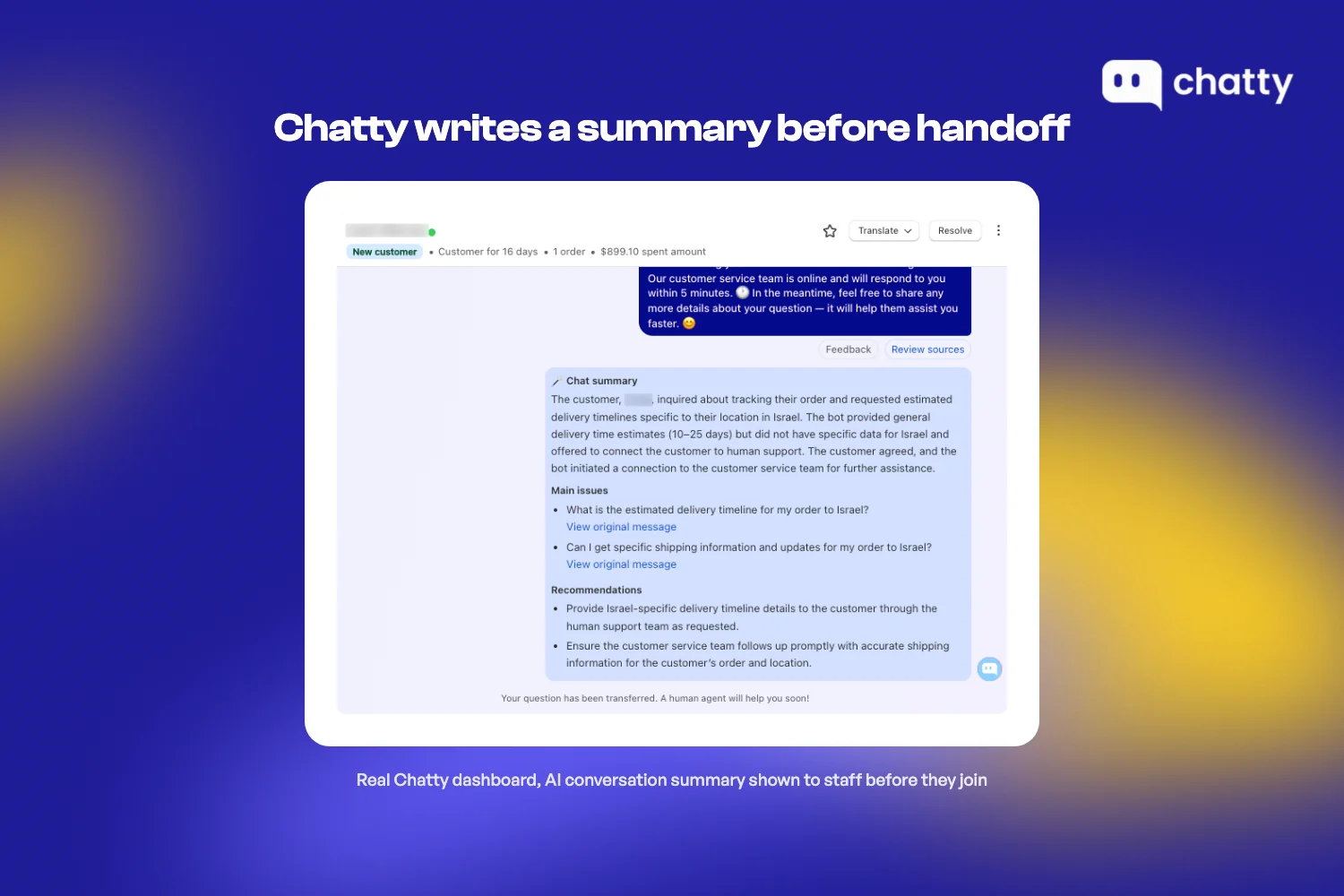
- Handoff with context. Inbox moves the chat to your staff with the AI's context. Chatty transfers always or on conditions you set, and its Summarize tool turns a chat into a short internal note.
Inbox has two strengths Chatty cannot match. It is free with no meter at any volume. And when a buyer signs in with Shop, its agent can use their preferences and purchase history from across Shopify.
Chatty's difference is in what you can teach the AI and watch. You add custom answers, URLs, files and instructions inside the app, with limits set by plan. You can also get notified about new messages in chats the AI is handling, and filter those chats in the inbox.
What Chatty and Shopify Inbox need before they go live
Neither app gives accurate answers without some setup. The work is different, so plan for it before you choose:
Setting up the Shopify Inbox agent
Inbox has the shortest path if your store already meets its requirements. Shopify's help center lists these steps and conditions:
- Your store must be on Basic, Grow, Advanced or Shopify Plus and use new customer accounts. Legacy accounts are not supported.
- Turn the agent on under Sales channels, then Inbox. Choose whether it answers every chat or only when your staff is unavailable.
- Set its persona: tone, style and rules.
- Add store facts through Shopify's separate Knowledge Base app, which Shopify says helps AI agents represent your business.
After launch, you rate the agent's replies with a thumbs up or down. Shopify notes that a rating guides future suggestions but does not change a reply the shopper already saw.
Setting up Chatty
Chatty syncs your Shopify catalog, then you add what the catalog does not say. Each plan sets how much you can add:
- Products the AI trains on: 200 on Free, 1,500 on Basic, 8,000 on Pro and no limit on Plus.
- Custom answers: 100 on Free, 1,000 on Basic, and unlimited on Pro and Plus.
- URLs and files: 20 on Free, 50 on Basic, 500 on Pro and 700 on Plus.
You also write instructions for how the AI should behave, and set when it transfers a chat to your team. Paid plans start with a 7-day free trial, so you can test real questions before you pay.
How each app reaches a shopper who leaves the chat
A chat that ends without contact details is a lead you cannot follow up. Here the two apps work differently, and Inbox's own reviews show how much it matters.
Per Shopify's conversation guide, a reply reaches a shopper who left only if they signed in or gave an email. Chatty's chat widget can show a pre-chat form that asks for a name and email first, and the shopper can still chat as a guest.
We read all 5,810 Shopify Inbox reviews on October 12, 2026. The ones posted since the agent launched explain the stakes:
- Reviews posted in 2026 before June 17 average 4.69. The 309 posted since then average 4.03, with a low of 3.73 in August.
- Since June 17, 60 one- and two-star reviews have text. By our count, 23 of them are about the new sign-in step and losing the shopper's email.
- An August reviewer reported that Shopify added an option to collect only a name and email. October reviews so far average 4.59.
Our full Shopify Inbox review covers the rest of what merchants report, and how to set the app up.
Running the numbers: what Chatty costs next to a free Inbox (verified October 2026)
Inbox costs $0 at any volume, so the only question is what Chatty costs for your store. Chatty counts a conversation only when its AI replies, and human chats never count.
Here is the cheapest Chatty plan at each monthly AI volume, using monthly list prices on chatty.net/pricing on October 12, 2026:
| AI conversations a month | Cheapest Chatty setup | You pay per month | Per AI conversation |
|---|---|---|---|
| 50 | Free | $0 | $0 |
| 100 | Basic | $19.99 | $0.20 |
| 200 | Basic + 100 extra at $0.40 | $59.99 | $0.30 |
| 300 | Pro (500 included) | $68.99 | $0.23 |
| 500 | Pro | $68.99 | $0.14 |
| 1,000 | Plus | $199 | $0.20 |
Two switch points fall out of this table. Above 222 AI conversations a month, Pro costs less than Basic plus extras. Above 825, Plus costs less than Pro plus extras.
Proactive chats and abandoned cart reminders start on Pro. So a store that wants chat to speak first pays at least $68.99 a month, against $0 for Inbox. Catalog size can also set your plan: Basic trains on 1,500 products, Pro on 8,000 and Plus has no product limit.
The fair test is simple. Ask whether one recovered cart a month would cover $68.99 in your store, and test it on the 7-day free trial.
Which one fits your store
Place your store with these two lists, each with three signs. Choose Shopify Inbox if:
- Most shoppers open the chat themselves and ask.
- You are on a Basic Shopify plan or higher and want a free AI agent.
- Support email works fine in your normal mailbox.
Choose Chatty if:
- You want chat to start conversations, such as cart reminders and product prompts.
- You want a name and email before the chat, without asking shoppers to sign in.
- You want support email as tickets in the same app as your chat.
Many stores start on Inbox and add an app once the gaps cost sales. For the short version, see our Chatty vs Shopify Inbox comparison page. For a wider field, see our list of alternatives to Shopify's free chat.
FAQ
Yes. Shopify Inbox is free on its Shopify App Store listing, and the AI agent is included. Shopify's help center lists two requirements: a Basic, Grow, Advanced or Shopify Plus plan, and new customer accounts.
Yes. Shopify's help center says the agent can add recommended products straight to the shopper's cart. Chatty does the same through an Add to cart button on its product cards, which puts the item in the shopper's real Shopify cart.
No. Shopify's help center, checked October 12, 2026, documents a greeting and automatic first replies. It describes no message triggered by a cart or by browsing.
Chatty sends proactive chats, including abandoned cart reminders, on its Pro and Plus plans.
The conversation moves to your staff, and the AI's context carries over. If no one on your team is available, the agent shares your store's email address so the shopper can write in.
In Chatty, you set when the AI transfers: always when a shopper asks for a person, or only when conditions you define are met.
Chatty does, and Shopify Inbox does not. Chatty includes a Helpdesk on every plan, including Free. Turn on Helpdesk ticket mode for a connected email address, and incoming emails become tickets with a priority and an assignee.
Shopify Inbox continues a chat by email when a signed-in shopper leaves. It does not turn emails sent to your support address into tickets.
Shopify Inbox is free at any volume. Chatty has four plans, checked October 12, 2026. Free includes 50 AI conversations a month, Basic is $19.99 for 100, Pro $68.99 for 500 and Plus $199 for 1,000.
Each extra AI conversation costs $0.40 on paid plans, with a spending limit you set. Human conversations are unlimited on every Chatty plan.
Yes. Chatty is a Shopify app with 4.9 stars from 1,877 reviews on the Shopify App Store. It syncs your Shopify catalog, and its charges appear on your Shopify invoice.